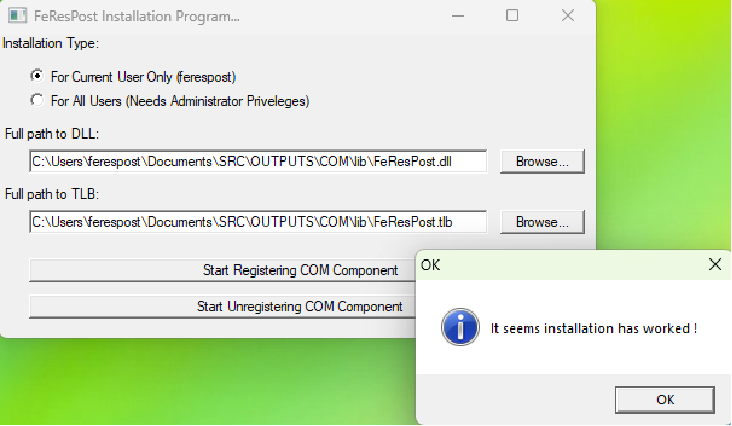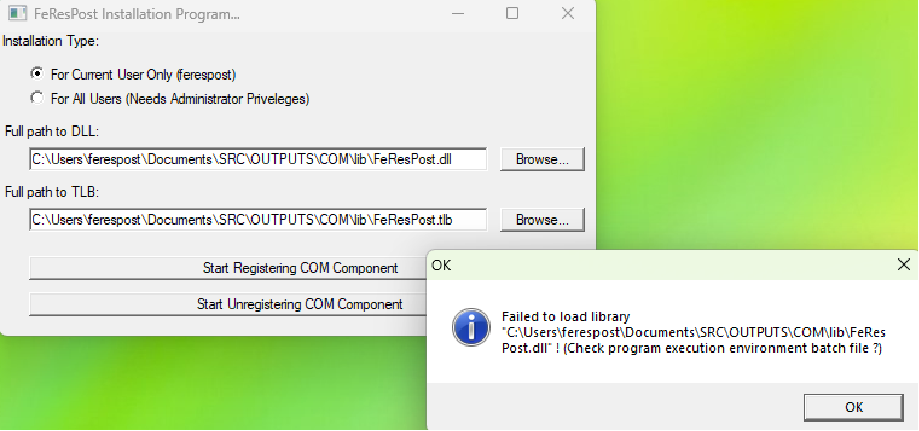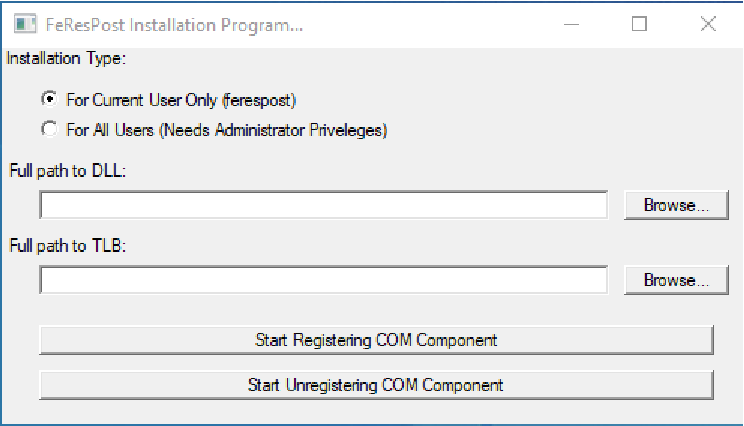
Figure X.A.1: Registration of FeResPost COM component.
Two solutions are proposed for the registration or un-registration of the COM component. One can use “modifyRegistry.exe”. Registration or un-registration is also possible using “reg” files.
COM server must be registered before use. For that purpose, a program called “modifyRegistry.exe” is distributed with FeResPost library. This program is used to add keys to the Windows registry. Some information follows:
The component can be registered for the current user only, or for all the users. In the second case, the registration program should be used on an account that has administrator privileges.
The registration program allows to register the component as well as to unregister it.
The registration program allows the user to select the part that shall be installed among:
The in-proc library “FeResPost.dll”,
The type library “FeResPost.tlb”,
The registration of type library (TLB) is not necessary if the COM component is used from compiled language. But the user must register the type library to use the component from interpreted languages VBA, ruby, python...
The standard and recommended configuration involves the registration of the in-proc library “FeResPost.dll”,’, and of the type library “FeResPost.tlb”.
Among the keys and values that are written to the Windows registry, the full paths to the dll, exe and tlb appear several times. This means that once the component has been registered, these files should not be moved. So, a proper location for the FeResPost library should be selected prior to its registration.
Several versions of FeResPost COM component can be installed at the same time on the same computer.
The examples presented in Part VII require only the registration of in-proc library and type library (recommended configuration).
Figure X.A.1 shows the window created by the "modifyRegistry.exe" program. After clicking one of the registration buttons, the program shows an information message allowing to check the correct installation of COM component (Figure X.A.2 or X.A.3). In many cases, failure is related to the impossibility of loading FeResPost library.
You may register either 32-bit version of the component, or 64-bit version of the component, or both 32-bit and 64-bit versions of the component:
The 64-bit version of the component works on 64-bit Windows only. On the other hand, the 32-bit version works on 32-bit as well as 64-bit versions of Windows. This means that the registration of both 32 and 64-bit versions of the COM component is possible only on 64-bit Windows OS.
Windows manages the writing of keys in the appropriate directories of the register. For example, when 32-bit component is registered in 64-bit Windows OS, CLASSES keys are defined in “HKLM/Software/Wow6432Node/Classes/CLSID” directory.
The registration is done with “modifyRegistry.exe” executable. The 64-bit “modifyRegistry.exe” must be used to register the 64-bit library, and the 32-bit “modifyRegistry.exe” must be used to register the 32-bit library.
The “dll” library name is the same for the 32-bit and 64-bit versions of the component. Therefore, the two dll files must be located in separate and preferably clearly identified directories.
The “tlb” file must be registered only once. For example, a possible scenario is to register the 32-bit “dll” library and the “tlb” file 32-bit version of “modifyRegistry.exe”, then use the 64-bit version of “modifyRegistry.exe” to register 64-bit “dll” library.
It is not always easy to determine whether the 32-bit or the 64-bit version of COM component is to be used. For example, 64-bit versions of ruby or python seem to require the 32-bit components that are accessed through “win32ole” or “win32con” extensions. Therefore, it may be a good idea to register the two versions.
When one gets rid of an older version of FeResPost, the 32-bit and 64-bit versions of the components must be un-registered separately.
FeResPost COM component is delivered with registration files in the “OUTPUTS/COM/REGFILES” directory. Four such files are available: “addAllUsers.reg”, “addCurrentUser.reg”, “removeAllUsers.reg” and “removeCurrentUser.reg”. The four files can be distinguished according to two criteria:
Two of the files add information to Windows registry, and two of the files are used to clean information from Windows registry.
Two of the files can be used to modify information for all users, and two of the files for current user only. To modify Windows registry information for all users requires Administrator privileges.
Before using the reg files that add information to Windows registry, you must ensure that the paths to “FeResPost.dll” and “FeResPost.tlb” match what their actual location on your computer. For example, the registry files delivered with COM binaries contain this kind of information:
 [HKEY_CURRENT_USER\Software\Classes\TypeLib\{0A88E969-53D5-492B-FABB-A0DF12862BE8}\1.0\0\win32]
 @="C:\\Users\\ferespost\\Documents\\SRC\\OUTPUTS\\COM\\lib\\FeResPost.tlb"
 ...
 [HKEY_CURRENT_USER\Software\Classes\CLSID\{52FEFC92-63E7-4500-768B-84B08E1262C1}\InprocServer32]
 @="C:\\Users\\ferespost\\Documents\\SRC\\OUTPUTS\\COM\\lib\\FeResPost.dll"
 "ThreadingModel"="apartment"
(Of course, the paths must be modified to match your installation.)
The sources come with a ruby script that is used to generate the registration files. The script can be used as follows:
 ruby bin/createRegFiles.rb  C:/Users/ferespost/Documents/SRC
   C:/Users/ferespost/Documents/SRC/OUTPUTS/COM 5.0.7 32
The three arguments of the ruby script are:
A string corresponding to the path to sources directory. The script needs this path because it reads the “idl” source files to identify the different GUIDS and associate them to classes and interfaces.
A string containing COM directory. The “REGFILES” directory containing all the registration files is located in that COM directory. (It is created if necessary.)
The third argument is a string identifying the version of COM component. Typically, the FeResPost version number is chosen. (5.0.7 in this case.) User can choose another identifier.
Last argument is 32 or 64 and specifies whether component is 32-bit or 64-bit.